Description
You are given an n x n 2D matrix representing an image, rotate the image by 90 degrees (clockwise).
You have to rotate the image in-place, which means you have to modify the input 2D matrix directly. DO NOT allocate another 2D matrix and do the rotation.
Example 1:
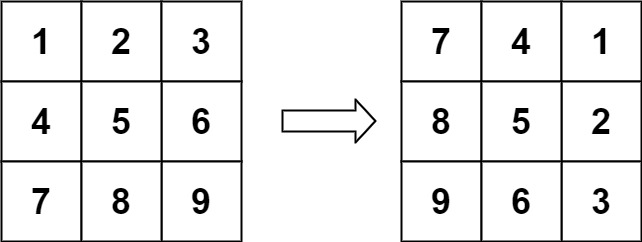
Input: matrix = [[1,2,3],[4,5,6],[7,8,9]] Output: [[7,4,1],[8,5,2],[9,6,3]]
Example 2:
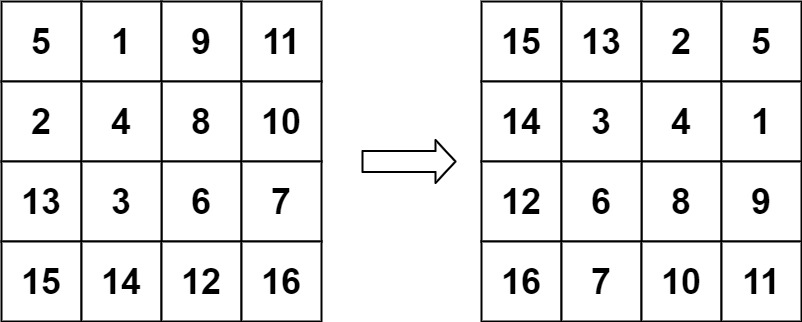
Input: matrix = [[5,1,9,11],[2,4,8,10],[13,3,6,7],[15,14,12,16]] Output: [[15,13,2,5],[14,3,4,1],[12,6,8,9],[16,7,10,11]]
Constraints:
n == matrix.length == matrix[i].length1 <= n <= 20-1000 <= matrix[i][j] <= 1000
Solutions
This code rotates a square matrix 90 degrees clockwise in-place by cycling elements through four positions in concentric layers. The function processes the matrix from the outside inward using nested loops: the outer loop row tracks which layer is being rotated, and the inner loop col iterates through elements in that layer, stopping halfway through the layer to avoid rotating elements twice. For each position (row, col), the code calculates the corresponding mirrored coordinates (invRow = n - 1 - row and invCol = n - 1 - col), then performs an inline 4-way swap where the value at (row, col) moves to (invCol, row), the value at (invCol, row) moves to (invRow, invCol), the value at (invRow, invCol) moves to (col, invRow), and the value at (col, invRow) returns to (row, col), effectively rotating those four values 90 degrees clockwise. By repeating this for all elements in all layers, the entire matrix is rotated in-place.
/**
* @param {number[][]} matrix
* @return {void} Do not return anything, modify matrix in-place instead.
*/
var rotate = function(matrix) {
const n = matrix.length;
const halfLen = n / 2;
for (let row = 0; row < halfLen; row++) {
const invRow = n - 1 - row;
for (let col = row; col < invRow; col++) {
const invCol = n - 1 - col;
const temp = matrix[row][col];
matrix[row][col] = matrix[invCol][row];
matrix[invCol][row] = matrix[invRow][invCol];
matrix[invRow][invCol] = matrix[col][invRow];
matrix[col][invRow] = temp;
}
}
};